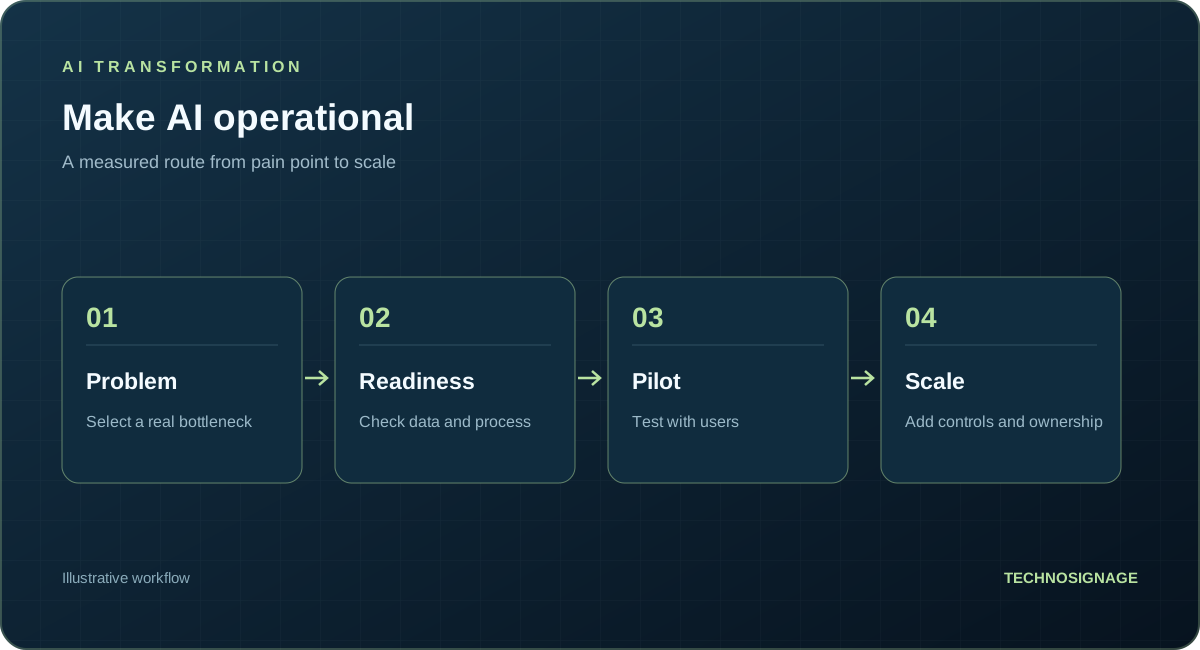
AI business transformation starts with a change in how work gets done: which tasks AI assists, which systems it connects, and who remains responsible for the outcome. For a Dubai or UAE business, the first useful step is often one clearly defined workflow rather than a company-wide rollout.
Your team may spend hours reading enquiries, copying invoice details, searching for policies, or explaining changes in weekly reports. AI can assist with the interpretation and drafting inside these tasks, while your existing software handles records, calculations, and approvals.
The examples below are illustrative workflows you could scope with TechnoSignage. They are not claims of completed client AI projects or guaranteed results. Each shows the work a person recognises, the information AI uses, and the review needed before the output is acted on.
AI solutions for business: six practical examples
1. AI document processing: turn an invoice into a draft record
The work today: An accounts employee opens a PDF, reads supplier details and line items, and enters them into the accounting system. Different layouts and scanned pages make the task repetitive.
Example input: A supplier invoice with a purchase-order reference, several line items, a subtotal, VAT, and a total.
What AI does: Reads the document and proposes structured fields, even when the supplier uses a different layout. It flags fields it cannot confidently interpret instead of silently filling the gaps.
Useful output: A draft invoice record with the source document available for checking, plus a queue of unclear fields. Fixed rules check arithmetic, required fields, and duplicate invoice numbers.
Human review: Accounts checks the extracted values and approves posting. AI does not approve payment.
What you need: Representative invoices, the required field list, examples of correctly completed records, and an agreed accounting-system integration or export.
2. Customer support automation: draft a reply to an enquiry
The work today: An employee reads an email or WhatsApp message, checks a policy or service list, and writes a reply. The same questions arrive in different wording.
Example input: "Can you arrange service for our vehicles next week, and what information do you need from us?"
What AI does: Identifies the request, finds relevant approved service information, and drafts a response asking for the missing details. If an answer depends on live availability, it uses an approved system lookup or passes that question to the team.
Useful output: A draft reply, suggested routing, and a list of information still needed. Arabic and English can be included in the scope and tested with your own examples.
Human review: A service employee confirms commitments, availability, and any unusual requirements before sending.
What you need: Current service information, approved FAQs, example enquiries, escalation rules, and access to the selected enquiry channel.
3. Sales: turn an unstructured enquiry into a clear handover
The work today: A salesperson reads a long message, identifies what the customer wants, asks follow-up questions, and copies the details into CRM.
Example input: "We have branches in Dubai and Abu Dhabi. We need a reporting portal for regional managers, connected to our current CRM, and want to discuss options this quarter."
What AI does: Extracts the stated locations, requirement, integration, and timing. It distinguishes stated facts from missing information and proposes relevant follow-up questions.
Useful output: A draft CRM note, a concise opportunity summary, and questions about users, source systems, budget, and decision-makers. A controlled integration can create the draft record after approval.
Human review: Sales confirms the details and decides the next step. AI should not invent a budget or treat an inferred need as a confirmed requirement.
What you need: Your qualification fields, product or service information, CRM access rules, and examples of good sales handovers.
4. HR or operations: find an answer inside approved company documents
The work today: Employees search shared folders or ask colleagues for the current travel, leave, or procurement policy.
Example input: "Which approvals do I need before booking travel for a client visit?"
What AI does: Searches the policy documents the employee is allowed to access and prepares an answer with links to the relevant source sections. If the policy is missing or contradictory, it identifies the gap and routes the question to the owner.
Useful output: A short answer with source references and a clear next step, rather than another search through folders.
Human review: The policy owner handles exceptions and resolves conflicting versions. The assistant must respect employee permissions.
What you need: Current approved documents, named owners, version control, and permission-aware access. Payroll or personal employee records are not needed for a general policy assistant.
5. Service operations: classify requests and prepare a handover
The work today: A coordinator reads incoming requests, identifies the issue, and sends each one to the appropriate team.
Example input: "The dealer portal lets me log in, but the monthly report is blank for our branch. Other branches can see theirs."
What AI does: Recognises the reporting issue, summarises what is known, suggests a category, and drafts questions about the branch, report period, and affected users.
Useful output: A draft ticket with a concise issue summary, suggested routing, missing information, and potentially relevant approved troubleshooting instructions.
Human review: The coordinator confirms priority and ownership. Actions that change access or production settings require separate authorisation.
What you need: Request categories, routing rules, approved troubleshooting material, example tickets, and the ticketing integration.
6. Management: turn verified reporting into a draft briefing
The work today: A manager reviews dashboards, reads departmental notes, and prepares commentary for a weekly performance meeting.
Example input: A verified regional KPI export and notes explaining a backlog in one market.
What AI does: Drafts a briefing that highlights changes in the supplied figures and connects them to the provided notes. It identifies questions needing investigation and cites its inputs.
Useful output: A draft management summary with supporting figures, source references, and follow-up questions. The reporting layer supplies the calculations; AI assists with explanation and drafting.
Human review: The manager checks the figures and interpretation. If the inputs do not establish why performance changed, the draft should present a question rather than claim a cause.
What you need: Agreed KPI definitions, reliable exports or controlled reporting access, departmental notes, and an example of the briefing your managers use.
AI strategy consulting: choose a useful first workflow
Choose a task that repeats, consumes meaningful staff effort, has accessible approved inputs, and produces an output someone can check. Document the current process before testing AI. Measure quality, review effort, and exceptions as well as speed.
For example, start invoice extraction with one agreed document scope and a draft export. Start customer-service assistance with approved FAQs and staff-reviewed replies. Expand into live system updates only after the initial workflow and its controls are evaluated.
Explore our existing AI automation services and scoped workflow pilot. The next sections explain how to prepare, how costs are scoped, and when a simpler approach is sufficient.
How AI consultants turn an opportunity into an implementation plan
An assessment turns a business problem into an implementation decision. It should give leadership, operations, and IT a shared view of the opportunity, constraints, and next step. It is useful even when the recommendation is to prepare the data or improve the existing system first.
1. Map the current workflow
Choose a specific process, such as routing service requests, reviewing supplier invoices, or answering internal policy questions. Identify who starts it, which systems it touches, where people make decisions, and what happens when information is incomplete.
Record volume, handling time, rework, and common exceptions. Include the effort spent checking and correcting work, rather than measuring only the first draft or first system response.
2. Compare the available approaches
Consider existing software features, fixed business rules, BI, AI assistance, and combinations of these. Define which steps need language interpretation or judgement and which can follow an explicit rule. Agree where a person must review an output or approve an action.
3. Review data and system access
Examine representative inputs and expected outputs. Check data ownership, quality, permissions, and available integration methods. A demonstration using uploaded files does not establish that the production system can access the right records securely and reliably.
4. Define the evidence needed to proceed
Agree on acceptance criteria before building. For invoice extraction, those might include correct fields, review effort, duplicate detection, and reliable export. For support drafting, they might include grounded answers, correct routing, and appropriate escalation when information is missing.
5. Produce an actionable decision pack
At TechnoSignage, the AI Opportunity and Production Readiness Assessment includes prioritised use cases, a workflow and ownership map, data and integration findings, security requirements, an initial architecture direction, and a phased roadmap with a planning range and next-step estimate.
The existing offer typically takes one to two weeks once the required stakeholders and information are available. The proposal confirms the scope and schedule. An assessment is a planning engagement; a working pilot or production application is separately scoped.
What data should you prepare?
You do not need to send your entire database before the first discussion. Begin with a workflow description, the systems involved, and examples you are authorised to share. Use redacted samples where possible, and agree an appropriate transfer method before sharing confidential records.
For document and invoice processing
Prepare examples from different suppliers or document layouts, a list of required fields, and examples of correctly completed records. Include scans, missing values, duplicates, and exceptions. Explain where the approved result must go, such as an accounting system, a spreadsheet, or a review queue.
For customer support or enquiry handling
Prepare approved FAQs, current policies, representative enquiries, and the rules for routing or escalation. Include questions the system should decline to answer. If Arabic and English are in scope, provide examples in both languages and check whether source material is current in each.
For reporting or forecasting
Prepare the relevant data sources, agreed KPI definitions, dates, identifiers, and known quality issues. Forecasting may require a longer and sufficiently representative history than a document assistant. If teams disagree about what a KPI means, resolve that definition before asking AI to interpret it.
For any workflow
- Who owns the data and can approve its use?
- Which users may see which records?
- How often does the information change?
- What does a correct output look like?
- Which examples are unusual but important?
- Can the system read or write through a supported API, database connection, or controlled export?
- Which actions require human approval?
There is no universal minimum number of records for every AI project. The sample must represent the task, its variation, and the consequences of error. Keep separate evaluation examples that were not used to develop the workflow. A small sample can test an assumption, but it cannot establish performance across every future scenario.
For permissions and confidential information, see what business data AI should be allowed to access.
How are AI consulting and implementation costs scoped?
Separate the assessment fee, pilot or validation work, production implementation, and ongoing operation. Ask for the deliverables and commercial assumptions at each stage so you can compare proposals on equivalent scope.
Assessment cost
The scope depends on the workflows and departments reviewed, stakeholder sessions, available documentation, systems examined, and required outputs. TechnoSignage prices the initial assessment as a fixed-scope engagement after qualification. Your proposal should identify what is included and what would require additional work.
Pilot and implementation cost
Two projects with the same label can require very different work. An assistant answering approved FAQs is different from an assistant that authenticates customers, checks live records, changes bookings, and handles exceptions across several systems.
The main cost drivers are:
- Number of workflows, channels, languages, and user roles.
- Data preparation, document variation, and migration requirements.
- Integration access, system limitations, and write permissions.
- Application interface, authentication, and approval flows.
- Evaluation, security review, deployment, and rollout requirements.
- Documentation, handover, and support responsibilities.
Ongoing cost
Budget for model or platform usage, hosting, storage, monitoring, integration maintenance, and support. Include the people needed to review exceptions, update approved knowledge, and investigate failures. Usage costs vary with volume, input length, model choice, and repeated processing, so a subscription or API estimate alone is not the complete operating budget.
For a meaningful quotation, ask for assumptions about monthly task volume, peak demand, included support, third-party charges, exclusions, and how scope changes are approved. Avoid comparing a file-upload demo with a connected production service as if they were the same deliverable.
When is automation appropriate, and when does it need AI?
Choose the approach based on the work rather than the technology label.
Use rules-based automation for explicit, stable decisions
Scheduled exports, fixed approval thresholds, required-field checks, and routing based on known categories can often use conventional software rules. For example, routing a request using a selected department does not require a language model.
Consider AI assistance for variable language or documents
AI may be useful when inputs vary and staff must interpret text, classify a request, extract information from different layouts, or draft a response from approved material. Test it against representative examples and keep a clear path for uncertainty and exceptions.
Use BI when the problem is trusted visibility
If leaders need consistent regional reporting, agreed KPIs, or a consolidated view of dealer performance, the first requirement may be data integration and BI. AI can help draft commentary over verified reports, as in the management example above, but the underlying data and KPI calculations still need a trusted reporting layer.
Improve the process first when ownership or inputs are unclear
Automation struggles when no one owns the workflow, policies conflict, or source records are unreliable. Fixing those conditions can be a better first investment. AI should not become another layer that conceals an unresolved operating problem.
Combine approaches when the workflow calls for it
An invoice workflow can use AI to extract fields, fixed rules to validate totals and detect duplicates, and a person to approve posting. Keep financial approvals and record updates under explicitly agreed controls. The useful question is which approach fits each step.
How do you decide whether a pilot is worth continuing?
Use a limited workflow with an agreed input set, reviewer, and acceptance criteria. Compare the current process with the proposed process using the same kinds of work. Count processing, review, correction, and exception handling time, along with ongoing system costs.
A useful evaluation records quality, handling time, failures, review burden, and integration reliability. State the test conditions and sample size. An impressive example is a demonstration; a production decision needs evidence across the variation the business actually handles.
Possible outcomes are to proceed, narrow the scope, improve the data, change the approach, or stop. A pilot should make that decision clearer. TechnoSignage already offers a scoped AI Workflow Pilot, with evaluation findings and a production recommendation. You can use that existing engagement when a specific workflow is ready to test.
How to choose an AI consulting company in Dubai
Look for a team that can explain your workflow, evaluate the available approaches, and define what a usable implementation requires. A credible AI consulting proposal should connect the business objective to deliverables, system access, evaluation, and ownership after launch.
Ask the company:
- How will you decide whether this task needs AI, conventional automation, or a process change?
- What will the assessment deliver before we approve implementation?
- How will you test normal cases, difficult inputs, and incorrect outputs?
- Which CRM, ERP, document, or reporting integrations are included?
- What access will the system need, and which actions require approval?
- Who owns the application, documentation, and ongoing support?
- Which costs are one-time delivery fees and which recur with usage?
Generative AI consulting is especially relevant to drafting, summarising, document search, and other language-heavy work. Business process automation also includes predictable software rules, approvals, and system connections. AI implementation services should explain how these pieces work together in your organisation rather than treating a model response as a finished business system.
TechnoSignage provides AI consulting services in Dubai, combining business process review, data readiness, strategy, and implementation planning. When a workflow is ready for delivery, explore our AI automation services or custom AI software development.
Your preparation checklist
Before your assessment discussion, gather:
- One workflow and the business outcome you want to improve.
- The process owner and people who perform or review the work.
- Approximate volume, current handling time, and recurring errors.
- The systems involved and the person responsible for integration access.
- Approved examples of normal work, difficult cases, and correct outputs.
- Data restrictions, required languages, and approval points.
- Your budget constraints and the decision you need the assessment to support.
If some information is missing, identify the owner who can help obtain it. You can begin with a clear problem and use the assessment to resolve the remaining questions.
Plan your AI business transformation with TechnoSignage
Tell us what the team does today, where work gets delayed, and which systems hold the information. We can help scope an assessment and determine whether AI, automation, BI, or a combination deserves further investigation.
Explore AI consulting in Dubai or discuss an AI assessment.
Further reading
Microsoft's AI adoption planning guidance covers data readiness, use-case prioritisation, and focused proofs of concept.
AWS guidance on designing a generative AI proof of concept covers business value, evaluation, data readiness, and feasibility.